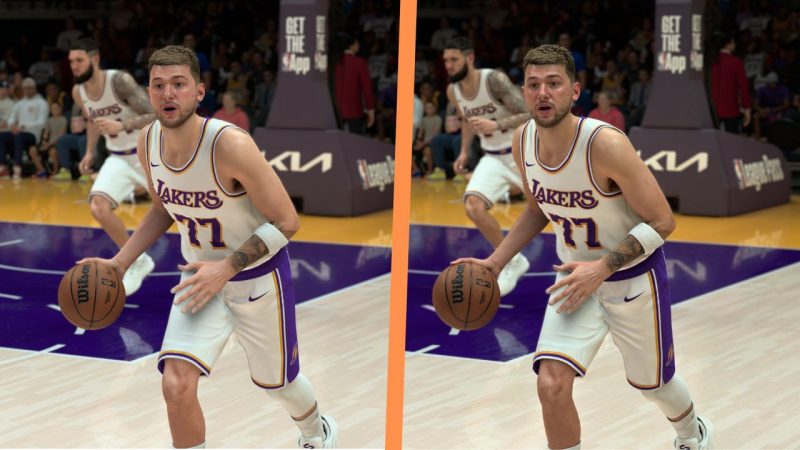
Ever wondered if Nvidia's latest DLSS tech is actually worth the hype? We dove into NBA 2K27 with DLSS 5 enabled for a solid two-hour session. Here's the lowdown on what it does to your game and your rig.
First off, the visual payoff is real. DLSS 5's AI upscaling makes player models and courts look crisper than ever, even on high-resolution displays. Textures pop, and the motion smoothing is buttery. But it's not all slam dunks—there are a few glitches that might make you think twice.
The biggest win? Performance. On my setup, DLSS 5 gave a noticeable FPS boost without sacrificing much visual quality. If you're running a mid-tier GPU, this could mean the difference between smooth 60fps and stuttery mess. For competitive players, that's a game-changer.
However, not everything is perfect. In fast-paced plays, I spotted occasional artifacts—like flickering on player jerseys and slight ghosting during quick cuts. It's not a dealbreaker, but if you're a pixel-peeper, you'll notice. Also, DLSS 5 seems to demand a bit more VRAM, so older cards might struggle.
Another thing: the AI upscaler sometimes struggles with the game's dynamic lighting, especially during arena transitions. It's not widespread, but those moments can pull you out of the immersion. Nvidia will likely patch these quirks, but for now, it's a mixed bag.
So, is DLSS 5 in NBA 2K27 worth it? If you're chasing higher frame rates and have a recent GPU, absolutely. But if you're on older hardware, you might want to wait for further optimization. What's your take? Have you tried DLSS 5 in other games? Let us know below!
Comments (0)
Log in to join the discussion
Log InNo comments yet